Showing posts with label iPad. Show all posts

Aug 19, 2011

iOS 5 Beta 6 Seeded to Developers

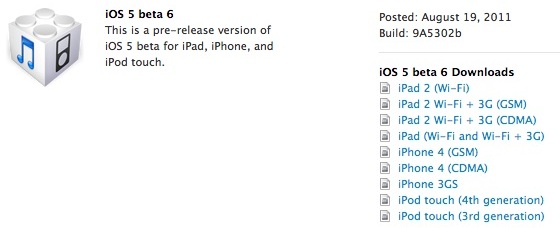
Apple today pushed out the sixth beta version of iOS 5 to developers, marking yet another step in the development process leading up to the public release of iOS 5 later this year. The release, which is labeled as Build 9A5302b, comes nearly two weeks after the surprise Saturday release of the fifth beta version earlier this month. 

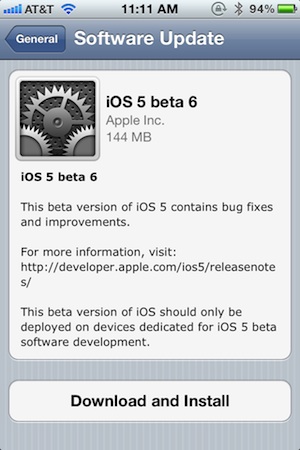
The over-the-air version of iOS 5 beta 6 for the iPhone checks in at 144 MB.

In addition to iOS 5 beta 6, Apple has also released a new beta version of iTunes 10.5 and a new preview version of Xcode 4.2 to support the release. 

Apple is expected to release iOS 5 for existing hardware around the time of the iPhone 5 launch, with rumors for the debut now coalescing around early October. 

Update: Apple has also pushed out iWork for iOS beta 2 and a new "beta 5" of the Apple TV software.

Download iOS 5 beta 6 ipsw iPhone 4, 3GS, iPod touch 4G, 3G, iPad 2, 1


If you found this post useful or interesting, don't forget to press the +1 Button
and leave a comment 

Fix Error 1611 iPhone 4, 3GS, iPod touch 4G, 3G, iPad When Restore 4.3.5 to 4.3.3


Error 1611 is on of the common errors that faces users while restoring their iPhone 4, 3GS, iPod touch 4G, 3G, iPad. When you get error 1611, iTunes shows this message “The iPhone "your device name" could not be restored. An unknown error has occurred (error 1611)". Let's check out how to fix 1611 error after the jump.

How to Fix Error 1611 iPhone 4, 3GS, iPod touch 4G, 3G, iPad 2, 1 after restore 4.3.5 to 4.3.3 :

Error 1611 can be fixed by one of the following trials, so you have to try "method 1", if you still have error 1611 try "method 2" :

Method 1: Reboot your computer and change the USB port.

Method 2: check out the below video guide to fix 1611 error.


Here's full downgrade guide from 4.3.5 to 4.3.3 - Click Here.


If you found this post useful or interesting, don't forget to press the Twitter Button
and leave a comment

Aug 10, 2011

Facebook Launches Standalone Messenger App for iPhone and iPad

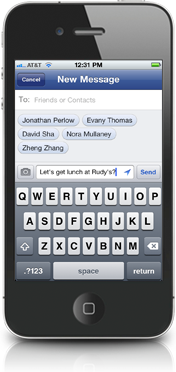
Facebook has released Facebook Messenger, an iPhone app focused on chat and messaging. The dedicated app allows users to send messages directly to friends whether they are on phones or using the Facebook website.

"Messenger is a separate app, so it only takes one click to get to your messages or send a new one. Messages are delivered through notifications and texts, so your friends are more likely to get them right away. 

You can use Messenger to reach all of your friends -- whether they're on Facebook or in your phone contacts. All you have to do is type the person's name."

The app is integrated with the Facebook messaging and chat service and all conversations are archived as part of ongoing conversations on Facebook. The app allows users to share their location and attach photos to conversations. Users aren't restricted to chatting with one friend either, group conversations are easily created as well. 

Facebook Messenger is a direct challenge to other messaging services like BlackBerry Messenger and Apple's forthcoming iMessage. Like those products, Facebook Messenger uses data, not text messages to communicate, which means the service isn't restricted by per-message charges or separate mobile phone charges. 

Facebook Messenger is a universal app available for iPhone, iPad and iPod Touch, free from the App Store.


If you found this post useful or interesting, don't forget to press the Twitter Button
and leave a comment

Aug 9, 2011

Jailbreak iOS 5 beta 5 - iPhone 4, 3GS, iPod Touch 4G, 3G, iPad - Redsn0w 0.9.8b5

As we reported you that Apple has released iOS 5 beta 5. Now iPhone dev-team has released Redsn0w 0.9.8b5 for Mac / Windows to jailbreak iOS 5 beta 5.


Jailbreak iOS 5 beta 5 - Supported Devices :

  • iPod touch 3G
  • iPod touch 4G
  • iPad 1
  • iPhone 3GS
  • iPhone4 (GSM)
  • iPhone4 (CDMA)
Warning: 

"Redsn0w has been updated to 0.9.8b5, adding support for Apple’s new iOS5 beta5 (point it directly at the beta5 IPSW). Please use this only if you’re a jailbreak app developer with a legit Apple dev account, and remember it’s a tethered jailbreak for now!"

Required Downloads:


If you found this post useful or interesting, don't forget to press the Twitter Button
and leave a comment

Jul 28, 2011

Save iOS 4.3.5 SHSH iPhone, iPad and iPod touch Blobs and Update iPhone 4 Baseband

TinyUmbrella for both Windows and Mac has been updated to version 5.00.07 to support save iOS 4.3.5 SHSH blobs for iPhone, iPod touch and iPad. This will help you to save SHSH certificates for iOS 4.3.5 as well as update iPhone 4 baseband. This is the first time updating iPhone 4 baseband functionality has been enabled in TinyUmbrella.


The iPhone 4 baseband update option should only be used by those who know what they are doing. If you are on a software unlocked iPhone, you should definitely not play with this setting. Anyhow, before you do proceed, take notice of the following:

  1. First, the version you WANT to restore to and the version Apple is currently signing must BOTH have the same baseband. This is important or else the baseband update will not work and you will get a 10xx error and need to use fixrecovery. (Works for iPhone 4 - will not work for iPad 2)
  2. Second, you need to realize that checking the box WILL UPDATE YOUR BASEBAND.
You have to manually select update iPhone 4 baseband option whenever you start TinyUmbrella. It will never be on by default.

As a reminder, to save your SHSH blobs, simply connect your iDevice via USB to your computer, launch TinyUmbrella, and click the “Save SHSH” button.

Download TinyUmbrella v5.00.07 for Windows
Download TinyUmbrella v5.00.07 for Mac


If you found this post useful, don't forget to press the Twitter Button
and leave a comment

Jul 26, 2011

Jailbreak 4.3.5 iPad 2 JailbreakMe

Earlier today Apple has released the unexpected iOS 4.3.5 for iPhone, iPod touch and iPad to fix a security issue. No doubt that there's many iPad 2 users have accedintely hit the update button. So far there's no strait way to Jailbreak 4.3.5 iPad 2.

There is only way to Jailbreak 4.3.5 iPad 2 so far, but it's only work with iPad 2 Wifi (not compatible with 3G iPad 2) as Jailbreak 4.3.5 iPad 2 based on downgrade process which doesn't work with those 3G iPads.

How to Jailbreak 4.3.5 iPad 2 JailbreakMe:

Step 1: You have to downgrade from iOS 4.3.5 to iOS 4.3.3 or lower, you can follow our downgrade tutorial - Click Here.

Step 2: Now you can jailbreak you iPad 2 running iOS 4.3.3 or lower using JailbreakMe 3.0, Here's our full tutorial -Click Here.

If you found this post useful, don't forget to press the Twitter Button

Jul 25, 2011

Facebook's Native iPad App Leaked

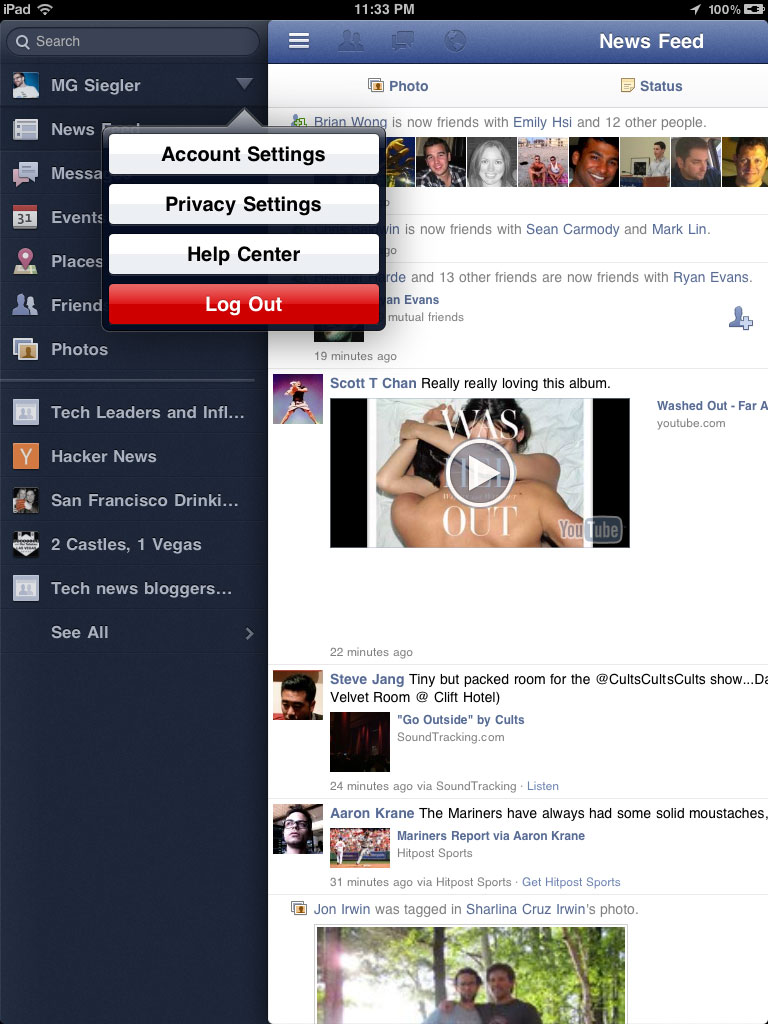
TechCrunch has posted an extensive gallery of screenshots from Facebook's long anticipated native iPad app. It turns out the latest update to Facebook's native iPhone application also included the code and resources for the iPad app. 

@AeroEchelon noticed a simple tweak to the iPhone version could enable it and posted the first screenshots of the iPad app to Twitter


TechCrunch's MG Siegler found the app to be quite good even in its non-public release form:

"The app also makes great use of the pop-overs (overlay menus) found in other iPad apps. When you flip the iPad horizontally, the list of your online friends appears and you can chat with them as you do other things on Facebook. The photo-viewer aspect looks great — similar to the iPad’s own native Photos app. Places exists with a nice big map to show you all your friends around you. Etc."

Facebook is said to be launching this native app shortly. Facebook's own native iPhone app has been consistently in the top Free apps on Apple's App Store. The company has not yet released an iPad version of their app, though the demand has been clear as 3rd party Facebook apps such as MyPad have consistently ranked in the iPad bestsellers since the iPad's launch. 

Flo's Weblog has posted instructions on how to modify the Facebook app so you can play 
with this early iPad release yourself.


Video tutorial on how to get Facebook for iPad


How to install Facebook on iPad 2 / iPad 1


If you found this post useful, don't forget to press the Twitter Button

Jul 11, 2011

iPad 2 Cydia Tweak Compatible List

Comex released long awaited jailbreak of iPad 2 couple of days ago. Jailbroken Millions of iOS devices have been jailbroken via JailbreakMe 3.0. If you have got your ipad 2 jailbroken then you must be staggering which Cydia Tweaks are compatible with ipad 2 right now. Below you will find list of Cydia Tweaks which is going to work on iPad 2:


  • SBSettings
  • iFile
  • OpenSSH
  • Retinapad
  • VLC media player
  • TCP optimizer
  • FullForce
  • Winterboard
  • Enable MT Gestures
  • Remove Background
  • Signal
  • InfiniFolders
  • CrashReporter
  • Springtomize
  • Barrel
  • Infinidock
  • Gridlock
  • Infiniboard
  • Orbit
  • multifl0w
The above list is brief but all the list of Cydia tweaks will add up gradually.

If you found this post useful, dont forget to click the +1 button

InPulse for iPad Jailbreak Theme Released In Cydia

If you're a big fan of custom jailbreak themes for iOS devices, you'll probably know about the InPulse theme. This particular theme has been very famous amongst jailbroken iPhone and iPod touch users, now the developer has released a totally re-optimized version, specially for the iPad.


As you probably know by now that just a week ago, JailbreakMe 3.0 iPad 2 jailbreak was released. So since that happened, the developer was getting increased requests to develop InPulse for iPad. The whole theme has been developed pixel by pixel and it looks great on the iPad. It should be kept in mind that this theme is compatible with the first generation iPad as well.

If you don't know how to jailbreak your iPad 2 using JailbreakMe 3.0, our easy to understand tutorial will teach youhow you can jailbreak iPad 2 in seconds.

InPulse for iPad is priced at $1.89, and is hosted in the ModMyi repository. If you install this theme, do let us know what you think about it, by posting a comment below.

If you found this post useful, dont forget to click the +1 button

Jul 10, 2011

Swype Beta 2 Released With Awesome Changes for iPad, iPhone, iPod

A famous tweak for iDevices sounding in the air for last two days, Swype has been updated. The new update should be installed to fix a number of bugs and to meet the tweak just to work exactly as is in Android phones.


The new version of Swype BETA2 makes it look likes just as it is in android phone. The first version of Swype was lacking blue trace line that made its usage a bit difficult. When the user makes a move from one letter to another letter, it makes an edge of blue trace line and assures user that he typing correctly.

If you have already installed Swype, then you can easily upgrade it to Beta2, and if you are willing to try this tweak then you can install it from the following repository wynd.x10.mx/repo.

If you found this post useful, dont forget to click the +1 button

Enable Multi Touch Gestures iPad

Multi-Touch gestures allows you to carryout basic tasks like flicking through apps,closing apps,or making multitasking tray popups. Let's see how to enable this feature on iPad after the jump.


This tutorial will show you how you can enable Multi-Touch gestures on your iPad.

Step 1: First of all ensure that your iPad must have jailbroken.

Step 2: Launch 'Cydia' and look out for 'MT Gestures Theme'.You have to install this app.It will also automatically install WinterBoard if you don't have it.

Step 3: You will need to launch WinterBoard and select right gestures for your device.Then close WinterBoard.

Step 4: You will need to Locate Settings > General > and switch to Multitasking Gestures active.

Thats all.Now you can enjoy with Multi-Touch Gestures feature.

If you found this post useful, dont forget to click the +1 button

Jul 6, 2011

iPad 2 Jailbreak 4.3.3 JailbreakMe 3.0 Official @Comex

iPad 2 Jailbreak released finally. Comex has just released his userland jailbreak JailbreakMe 3.0 to jailbreak iPad 2 on iOS 4.3.3 untethered. JailbreakMe doesn't support iOS 5 jailbreak for iPad 2 so far. iOS 4.3.2 / 4.3.1 / 4.3 will be supported soon.


iPad 2 Jailbreak iOS 4.3.3 Guide

iPad 2 jailbreak with jailbreakMe is very easy. To Jailbreak iPad 2, there's no need to connect your iPad 2  with iTunes as iPad 2 jailbreak can be done directly form your Safari via internet.


Step 1 : You have to upgrade to iOS 4.3.3 if you didn't already running it. Download iOS 4.3.3.

Step 2: Just navigate your Safari Browser to http://jailbreakme.com and hit the "Free" button


Step 3: You will have a jailbroken iPad 2 after minutes of some processes. Enjoy ;)

Jailbreak iPad 2 in Video :

Huge thanks is due to Comex

If you found this post useful, dont forget to click the +1 button

Jul 2, 2011

iPad 2 Jailbreak!


Not official version! Not by @comex!

You Need:
1. iPad 2 with iOS 4.3.0, not higher. If yours is higher, wait for @comex's version!
2. Open Safari from your iPad 2 and access following address: http://t.co/OCWcFqV
3. Safari will close automaticaly and Cydia™ icon will apear on Springboard!
4. Once Cydia™ is installed, restart the iPad 2! This may take longer than usual! Don't panic, it's normal!

When the restart is done, Cydia™ should run normally!


If the first link doesn't work, here are some alternate links:
www.ipad2jailbreakpdf.weebly.com


If you found this post useful, dont forget to click the +1 button down ()