Feb 4, 2012

iMessages Going to Wrong iPhone "Isn't a Bug" Claims Apple


In December, an apparent bug appeared in Apple's iMessage service that allowed iMessages to be sent to a stolen iPhone. Earlier this week, Gizmodo reported that a customer who went to Apple's Genius Bar began receiving iMessages to and from the Genius who helped fix their phone. 

It appears that the Genius took his personal SIM card and inserted it into the customer's iPhone as part of a series of unofficial and unapproved diagnostic efforts to fix the customer's phone. An Apple representative explained to The Loop's Jim Dalrymple that the issue in the Gizmodo story wasn't a bug, but instead was the result of the Genius not following protocol. 

“This was an extremely rare situation that occurred when a retail employee did not follow the correct service procedure and used their personal SIM to help a customer who did not have a working SIM,” Apple representative Natalie Harrison told The Loop. “This resulted in a temporary situation that has since been resolved by the employee.”

The act of installing an employee's personal SIM card into a customer's iPhone is obviously not an approved procedure at the Genius Bar. However, the fact that the Genius wasn't supposed to perform this act does not mean that this was merely an "extremely rare situation". 

In the Gizmodo situation, a customer was having difficulties with her iPhone 4 and took it to the Genius Bar to be serviced. When it was returned, the phone was in perfect working order, except for one thing: it displayed every incoming and outgoing iMessage meant for the Genius. Because he had inserted his personal SIM card into the iPhone during the diagnostic process, it registered with Apple's iMessage servers and began sending all of his messages to the customer's phone. 

A number of customers have reported similar iMessage issues, including messages continuing to go to a stolen iPhone after a remote wipe and a SIM card deactivation. This is obviously an unintended action, and though Apple explains the solution to be "toggle iMessage on and off" in the Settings app, that is an impossible act to perform remotely on a stolen phone. 

(Image via Ars Technica)


If you found this post useful or interesting, don't forget to press the +1 Button

and leave a comment 

No Apple Event Scheduled for February


Earlier today, Japanese blog Macotakara claimed that Apple will be holding an "unusual" event in February, backtracking somewhat on its earlier claim of an early February iPad 3 event. 

The Loop's well-connected Jim Dalrymple now reports that Apple will not hold an event in February, indicating that observers waiting for the iPad 3 or other major announcement from Apple will need to hold out until at least March.

"This is not going to happen, according to my sources. Apple will not hold an event in February, unusual or otherwise. That’s it."

Dalrymple has in the past quashed inaccurate rumors regarding Apple media events, and has proven to have reliable information.


If you found this post useful or interesting, don't forget to press the +1 Button

and leave a comment 

Feb 2, 2012

Apple Poised to Benefit from U.S. Government's Five-Year Push for Digital Textbooks

The Associated Press reports on a new initiative from the U.S. government to help push schools and textbook companies make the transition to digital textbooks over the next five years. With Apple pushing itself to the forefront of the digital textbook discussion with its iBooks Textbooks launch just two weeks ago, the company stands to significantly benefit if its iPad hardware becomes a primary tool in the move to digital textbooks.

"Education Secretary Arne Duncan and Federal Communications Commission chairman Julius Genachowski on Wednesday challenged schools and companies to get digital textbooks in students' hands within five years. [...] 

Tied to Wednesday's announcement at a digital town hall was the government's release of a 67-page "playbook" to schools that promotes the use of digital textbooks and offers guidance. The administration hopes that dollars spent on traditional textbooks can instead go toward making digital learning more feasible."

The report notes that the K-12 textbook industry is an $8 billion per year market in the U.S. and that textbook companies have been working for a number of years on digital initiatives. The primary roadblock, according to the textbook publishers, has been that schools simply don't have the hardware necessary to make the full commitment to digital learning. 

With the iPad starting at $499, pricing is undoubtedly still a significant hurdle for schools that will need to purchase the devices in significant quantities, although Apple has been rumored to be looking to bring the entry-level pricing down in the coming months by continuing to offer the iPad 2 alongside the new iPad 3.


If you found this post useful or interesting, don't forget to press the +1 Button

and leave a comment 

OS X 10.7.3 Update Issues Fixable in Many Cases with Combo Version

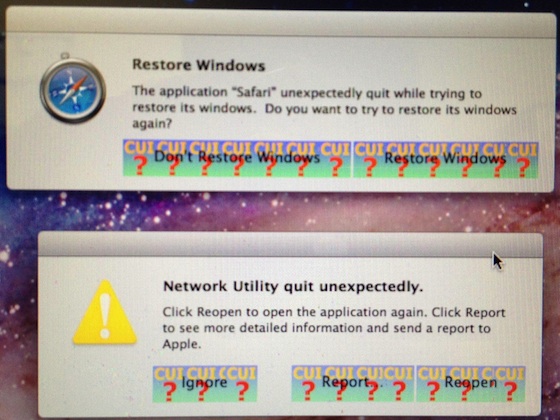
Following yesterday's release of OS X 10.7.3, a number of users in our forums and at Apple's discussion forums began reporting issues with the update. The most serious of these issues seems to be widespread crashing of apps generally accompanied by an artwork error in the crash notice window in which the window's buttons are replaced with graphics showing "CUI" and question marks. 


In general, users have found that applying the combo version of the OS X 10.7.3 update rather than the standard delta version typically offered via Software Update will fix the issues. The combo update can even be applied over an existing installation that is exhibiting the problem. 

With the crashing issues perhaps causing users difficulties in applying the combo update to fix the problem, OS X Daily provides a nice summary of how this can be accomplished:

The simple formula is this: 

- Download Mac OS X 10.7.3 Combo Updater (direct link) 
- Run the 10.7.3 Combo Updater on top of the existing 10.7.3 installation 
- Reboot 

If you can’t get to the desktop of the Mac in question, you can boot it with Target Disk Mode(Firewire or Thunderbolt required), and then point the 10.7.3 Combo Update at the troubled Mac and install it that way. If your OS X installation is totally screwed up and you can’t use target disk mode, you have a few choices: 

1. Restore from a recent pre-10.7.3 Time Machine backup, then install the Combo Updater 
2. Boot from Recovery HD, a Recovery Drive, or Lion USB drive, and reinstall everything 

Not the best situation, but hopefully you have recent Time Machine backups.

The report also notes that users who already updated and are unaffected by the issues but still concerned that there may still be issues lurking can back up their systems and simply install the combo version for peace of mind.


If you found this post useful or interesting, don't forget to press the +1 Button

and leave a comment 
Avid Takes on Apple's iMovie with Avid Studio for iPad


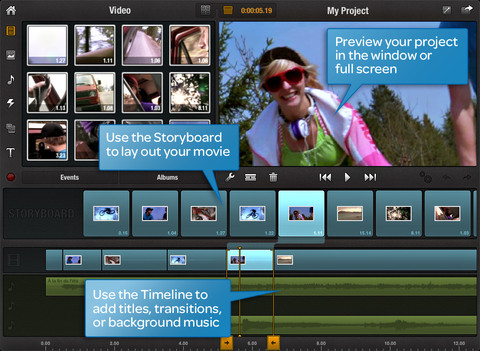
While companies such as Avid and Adobe have attempted to capitalize on Apple's Final Cut Pro X missteps by wooing users in need of professional video editing and production software, AllThingsDnotes that Avid is pushing forward on the mobile "prosumer" front with its just-launched Avid Studio [App Store] app for iPad. 

The iPad obviously imposes some limitations on what can be done with the software compared with the full Avid Studio for Windows, but Avid suggests that it is full-featured enough to be used for editing on the go and is ideally suited as a companion to the desktop app.

"The idea is that the iPad app and the desktop software are complementary, [Avid vice president Tanguy] Leborgne said, so that users who want to create and edit projects on the go can do so, but ultimately preserve them by taking them to the PC. 

The Avid iPad app does have some nice features, including an interface that includes a storyboard area and an editing timeline. And while some video editors rely heavily on customized keyboards or a mouse, others might appreciate the ability to pinch and squeeze videos and images to scale them on the touchscreen of the iPad, or the ability to move text and titles around with their fingers."


Avid Studio for iPad is launching with an introductory price tag of $4.99, which will increase to $7.99 after the first month.


If you found this post useful or interesting, don't forget to press the +1 Button

and leave a comment 

iPad 3 Event in March, An 'Unusual' Apple Event in February?


Japanese blog Macotakara has posted a follow-up to their previous claim of a February iPad 3 media event. 

The original report had claimed that Apple would hold an iPad 3 media event in February with product launch in March. We had expressed some doubts about the long lead time between event and launch. Macotakara has had a mixed track record in the past, but has had enough hits that they continue to warrant attention.

The site is now reporting that while there will be an event in February, that it would be a "strange" (or unusual) event rather than the usual product announcement event:

"I reported that Apple was going to hold Special Event in early February according to Asian supplier and source from united states, but this report told a half-side of truth. Apple will hold "Strange" event at February instead of Special Event."

Meanwhile, they now report that the iPad 3 announcement and launch will both take places in March. 

Appleinsider contacted the author for clarification but was only told that the February event would not be a product event.


If you found this post useful or interesting, don't forget to press the +1 Button

and leave a comment